








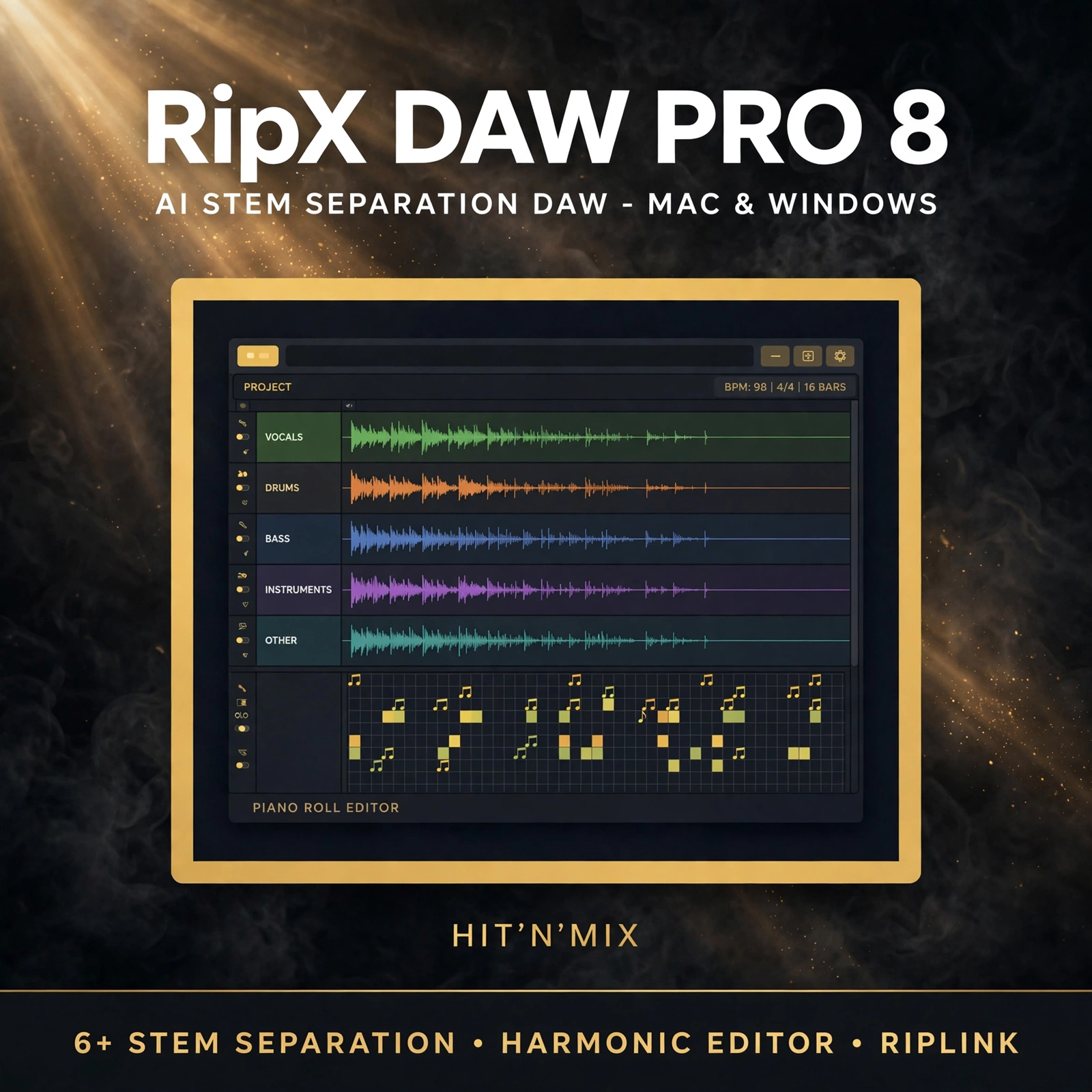
Hit’n’Mix RipX DAW PRO 8 Plugin Host DAW – Mac & Windows
Original price was: €138.00.€59.99Current price is: €59.99.
You save 57%Hit’n’Mix RipX DAW PRO 8 is a standalone AI DAW for Mac & Windows that hosts VST/VST3 plug-ins and edits audio like MIDI: 6+ stem separation, note and harmonic editing, Audioshop, repair tools, RipScripts and RipLink. Version 8 adds Track Starters and 11 new FX. Now €59.99 instead of €138.
- Pay securely — checkout takes under a minute
- Check your email — your download link arrives instantly
- Install & produce — preactivated and ready to use
RipX DAW PRO 8 by Hit’n’Mix is the AI DAW that edits audio like MIDI.
It converts recordings into the Rip format, where stems, notes, chords and harmonics become editable parts. Separate a mix into stems, rewrite harmony note by note, clean up noise, and design new sounds from harmonic content — in a standalone DAW for Mac and Windows that also hosts VST and VST3 plug-ins.
The PRO edition adds Audioshop tools, the Harmonic Editor, clean-up and repair, unpitched audio editing, RipScripts and RipLink. Version 8 adds Track Starters, RipLoops, one-click looping, chord progression tools, 11 new effects, new sounds and loops, and a refreshed interface.
Stem separation that treats audio as music
Award-winning AI separation divides mixed audio into six or more stems and layers. Unlike spectrum editors that smear overlapping frequencies, RipX DAW PRO 8 separates at harmonic level, so a vocal over guitars or a bass under keyboards comes apart cleanly.
Each stem is then editable at note level: pitch, timing, level, panning and timbre per note, with chords that can be rewritten from the notes in the recording itself.
For remixers and DJs, this means acapellas and instrumentals from any finished track. For producers, it means rescuing parts from old mixes. For post and dialogue work, it means extracting clean speech from noisy recordings with fewer artifacts than conventional tools.
Audioshop and the Harmonic Editor
Audioshop is the detailed editing bench: Edit Unpitched gathers unpitched sound for separate handling; Draw Sound paints notes, drums and samples onto a Rip; Split and Join reshape notes; Clone copies vibrato, timbre and panning between notes; Draw Pitch bends pitch by dragging; Apply Pattern and Smooth Region shape expression.
The Harmonic Editor works at the deepest level — the actual harmonics of each note — for removing noise, adjusting timbre and creating new sounds.
Clean & Repair supports the same workflow: background noise and hum removed, foreground artifacts limited, overtones adjusted, fundamental harmonics regenerated to restore bass, sibilance tamed with the De-Esser, and vinyl crackle cleaned during digitisation.
Audio-to-video editing is available on macOS.
Track Starters, effects and workflow in version 8
Version 8 keeps sessions in flow. Track Starters autogenerate dynamic templates that fit the project’s scale and chord progression, editable throughout. RipLoops add generated loops and transitions. Any selection loops with one click.
New effects — RipTone, RipTrip, RipVibe, Pitch To Chord, Transient Shaper, Auto-Pan, Hall Reverb, Tape Echo, Shimmer, Bitcrush, Granular — expand sound design, and the refreshed toolbar layout with context pop-ups reduces menu diving. RipX for iPhone compatibility adds REACT FX & Sounds.
RipScripts and RipLink integration
RipScripts is a Python scripting language inside RipX DAW PRO 8 for automating edits and building custom tools; Audioshop and the Harmonic Editor are RipScripts themselves.
RipLink (VST3/ARA2 and AudioSuite) integrates with Pro Tools, Studio One, Cubase/Nuendo, Reaper and Cakewalk, and RipX can be set as the external sample editor in Logic Pro, Ableton Live, FL Studio, ACID Pro, Digital Performer and Mixcraft.
System requirements for RipX DAW PRO 8 on Mac and Windows
RipX DAW PRO 8 requires macOS 10.15 or later (2012 and later models, including Apple Silicon M1 onwards) or 64-bit Windows 10/11.
Minimum: 2-core 2.5GHz CPU, 8 GB RAM, 20 GB free disk space. Recommended: 4+ core CPU or Apple Silicon M1, 16+ GB RAM, 20 GB free disk space.
On Windows, NVIDIA GeForce GPUs (1070 to 50XX series) with 16 GB RAM deliver much faster ripping. Activation needs an internet connection the first time and at least once every 15 runs; offline activation is available on request, and the licence may be installed on up to two computers belonging to the registered owner.
Frequently asked questions about RipX DAW PRO 8
Does RipX DAW PRO 8 work on Mac and Windows? Yes, both platforms are included with the same PRO feature set.
Can it host plug-ins? Yes. It is a standalone DAW and hosts VST and VST3 plug-ins.
What does PRO add? Audioshop, Harmonic Editor, clean-up and repair, unpitched editing, RipScripts, RipLink and advanced stem/AI clean-up.
Is a trial available? Hit’n’Mix offers a 21-day free trial. This listing is the full paid licence.
Related products
 -84%
Image-Line FL Studio Producer Edition v26.1 All Plugins Edition – Complete DAW Collection
Original price was: €499.00.€79.99Current price is: €79.99.
Join 60,000+ producers bagging bigger sounds for less
Cheap VST plugins, DAWs and bundles for up to 90% less than retail — preactivated with instant download.
Reviews
Clear filtersThere are no reviews yet.